NOTE
You can read this here in Finnish.
Pico 4 Ultra: The Budget Apple Vision Pro
I have owned the Pico 4 Ultra now for over 4 months, over these past months I have used the device for hours nearly every day be it inside, outside or in the car. I've put this device through it's upper limits.
This article is more of an overview and review of the device, what it is capable of and what I like about it as well as the things that could still be improved upon. It's an amazing device with some less so amazing quirks.
NOTE
This review is written as of PicoOS 5.13.3 software update, the device receives regular updates, some of the mentioned issues/limitations may be invalid in the future.
Specs
Let's begin with specs, I won't bore you with the technical details, however I will quickly write about topics such as Optics, Image Quality, Processor and so on.
Optics
the Pico 4 Ultra has Pancake Lenses, which are known for their enhanced image clarity compared to Fresnel lenses, however these do come with the downside of efficiency, even Pico 4 Ultra with it's LCD panels is only capable of 25% light efficiency at best, which makes optics very dim in comparison to alternatives.
Optics which Pico 4 Ultra uses have amazing binocular overlap which I've measured consistently as over 90%+ using wimfov with a Field of View of roughly 102 for both Horizontal and Vertical which is impressive.
Brightness on the Pico 4 Ultra has been improved over it's predecessor Pico 4 which has improved brightness up to 25% which makes Pico 4 Ultra comfortably bright, but it's still lacking in comparison to other devices I have tried.
While the Pico 4 Ultra does have a reasonably huge sweetspot which I do not find fault in, it does not have the best E2EC (Edge to Edge Clarity) I'm seeing some blur on the last 5% of the outer visible FoV in my vision which I don't find as annoying.
I would like to also mention, I have IPD of 56 mm which falls below the 58mm minimum range of Pico, some users are able to use smaller IPD than their physical IPD which allows achieving perfect 100% binocular overlap.
Displays
The Pico 4 Ultra uses a pair of SHARP 2.56" 2160x2160 RGB Stripe Oxide TFT-LCD panel with WLED backlight the panel is rated for 520 nit. The panel has the following colour gamut coverages; 100% sRGB, 87% DCI-P3 and 62% Rec.2020.
NOTE
Specs are outsourced from publicly available data based on parts numbers extracted from the headset, this data may be inaccurate and serves as general basis.
However, once you put the device on those specifications become utterly useless, as they don't tell the whole story. Optics and Displays are Intervened in a way that both affect each others performance.
The colours are no longer washed out as they were on the Pico 4, thanks to the new colour calibration process they are vibrant and they provide a great viewing experience in both dark and bright scenes.
The displays are high resolution at 2160x2160 which eliminates SDE (Screen-Door-Effect) and I cannot perceive Mura on the display, but due to the Pico optic properties, it causes the black dots between the pixels to be perceivable if you pay attention to it.
Processing
the Pico 4 Ultra uses Snapdragon XR2 Gen 2 with a proper thermal solution, which allows you to push the XR2 Gen 2 to it's limits and achieving extremely impressive performance.
the device has 12 GB of RAM which means developers have more resources to build their experiences which for example may allow higher fidelity textures.
the device has of 256 GB of inbuilt UFS 3.2 storage, that is enough to fit Super Mario 64 32,768 times into your device.
Weight
Headset
the Pico 4 Ultra weights roughly 580 grams which is evenly distributed on the front and rear, the processing, optics, displays and such are on the front, where as the battery of the device is in the back.
Controllers
Each controller weights roughly around 166 grams.
Tracking
The tracking on the Pico 4 Ultra is a mixed bag of feelings, the performance is disappointing sometimes but we need to look at the bigger picture to come to an conclusion.
Headset
it doesn't quite work in low-light conditions which is really an issue under certain conditions, it may also perform poorly in clean environments as the tracking algorithm benefits from noise (unique patterns, unpredictability, noise, etc)
The tracking has a lot jitter which makes it not compatible with OpenVR-SpaceCalibrator, your mileage may vary on a various of factors, in my personal experience when using with Index Controllers the position gets disaligned constantly, you are required to use Continious Tracking, but even the Pico tracking has an offset which may annoy some people.
Controllers
The controllers are able to track even if Headset Tracking is turned off without an issue, but if it is enabled the algorithm will fuse Hand Tracking and Controller Tracking together for improved tracking accuracy.
The tracking is perfectly okay but the tracking accuracy may suffer if the controller is partially covered or goes too much behind your back, as the Pico 4 Ultra controllers no longer have tracking rings which improved tracking capability in these edge cases.
There is a bug, where sometimes when the controller doesn't move for a certain period, it will attach to your hand as it uses this information to help tracking data when the controller may not be able to track itself precisely.
Hand Tracking
Hand Tracking capabilities of the Pico 4 Ultra are usable for basic interaction.
The tracking FoV is not great, it's on par with the original Leapmotion Controller 1 which was roughly 120 degrees, the algorithm also has a lot of latency that doesn't make it particularly enjoyable for more interactive experiences.
It can track your fingers pretty reliably if you aren't doing less common gestures such as crossing fingers, pulling back joints or convering your fingers partially.
Controllers
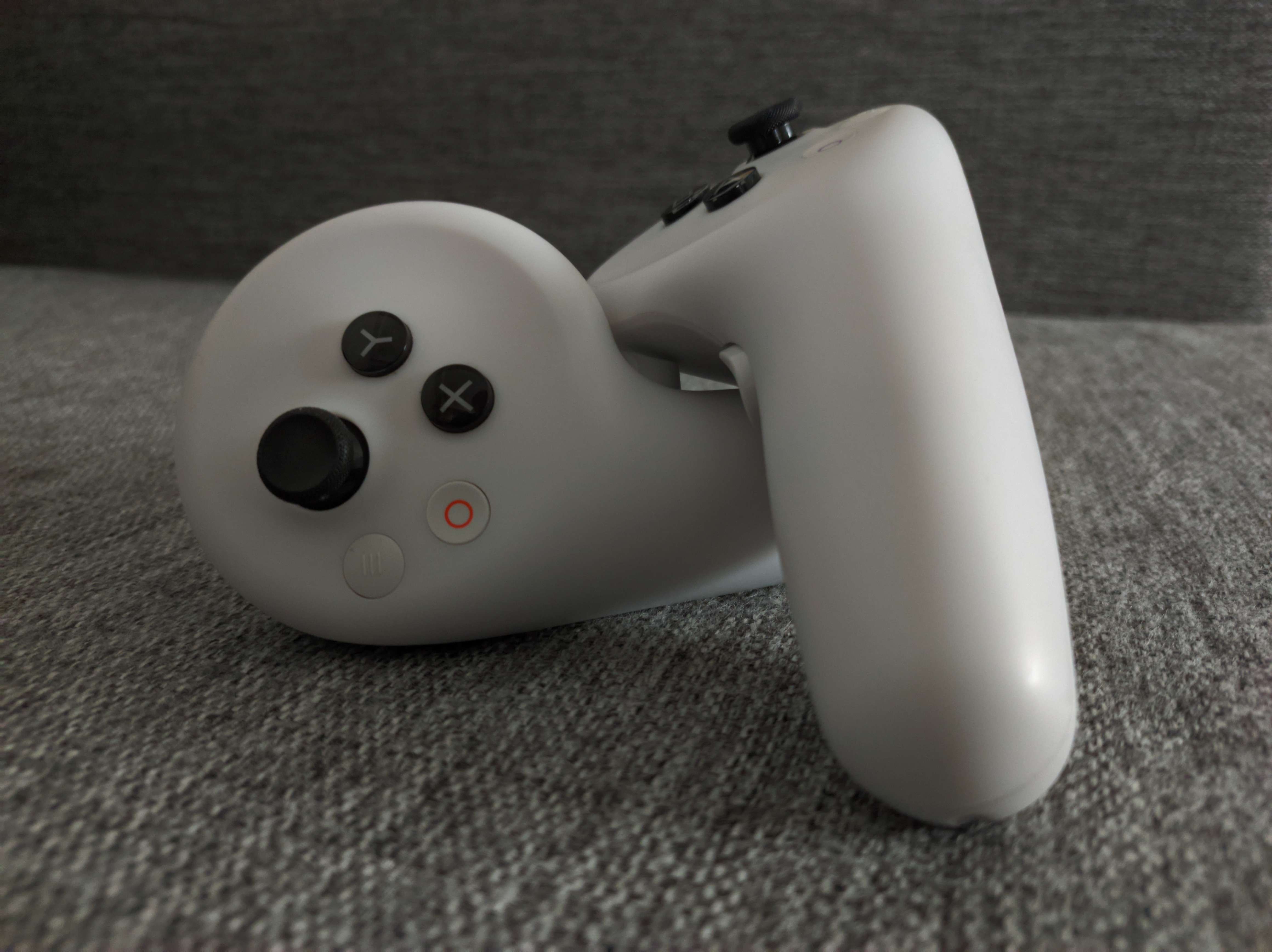
The Pico 4 Ultra controllers are different from Pico 4 controllers, the missing tracking ring is the most obvious part.
Layout
On both controllers you find a system button, which can be used to open the system dock or to recenter your game during game play.
On the left controller you have a menu button, which can be used for anything by the developers, in Streaming this button is used as a binding for the SteamVR overlay, you can also find a XY buttons for general inputs with a trigger, side trigger and a thumbstick, all of these buttons contain capacitive sensor, except the side trigger.
On the right controller you have a screenshot or record button, which allows you to at any moment of time take a screenshot or start screen recording, I personally have found this really useful. And then we have the rest of the buttons just like on the left controller.
Battery & Charging
The controllers are powered with dual AA batteries which last over two months without having to charge, or replace the batteries.
Ergonomics
The controllers are shaped for a comfortable grip and they feel great in your hand, they are not too large or small, but this may wary for you as people have different sized hands.
Headset
Ergonomics
The Pico 4 Ultra is relatively comfortable out of the box, one of the best I have tried thanks to the balanced design, however the stock faceplate and rearpad are not comfortable for long term wear in my opinion, this waries on shape of your face and other factors.
I could wear the device for few hours til my forehead started feeling too much pressure due to the incompatible shape of the faceplate which forces me to end my session for relief.
They do also provide a glasses space in the box, which lets users with glasses wear the headset more comfortably.
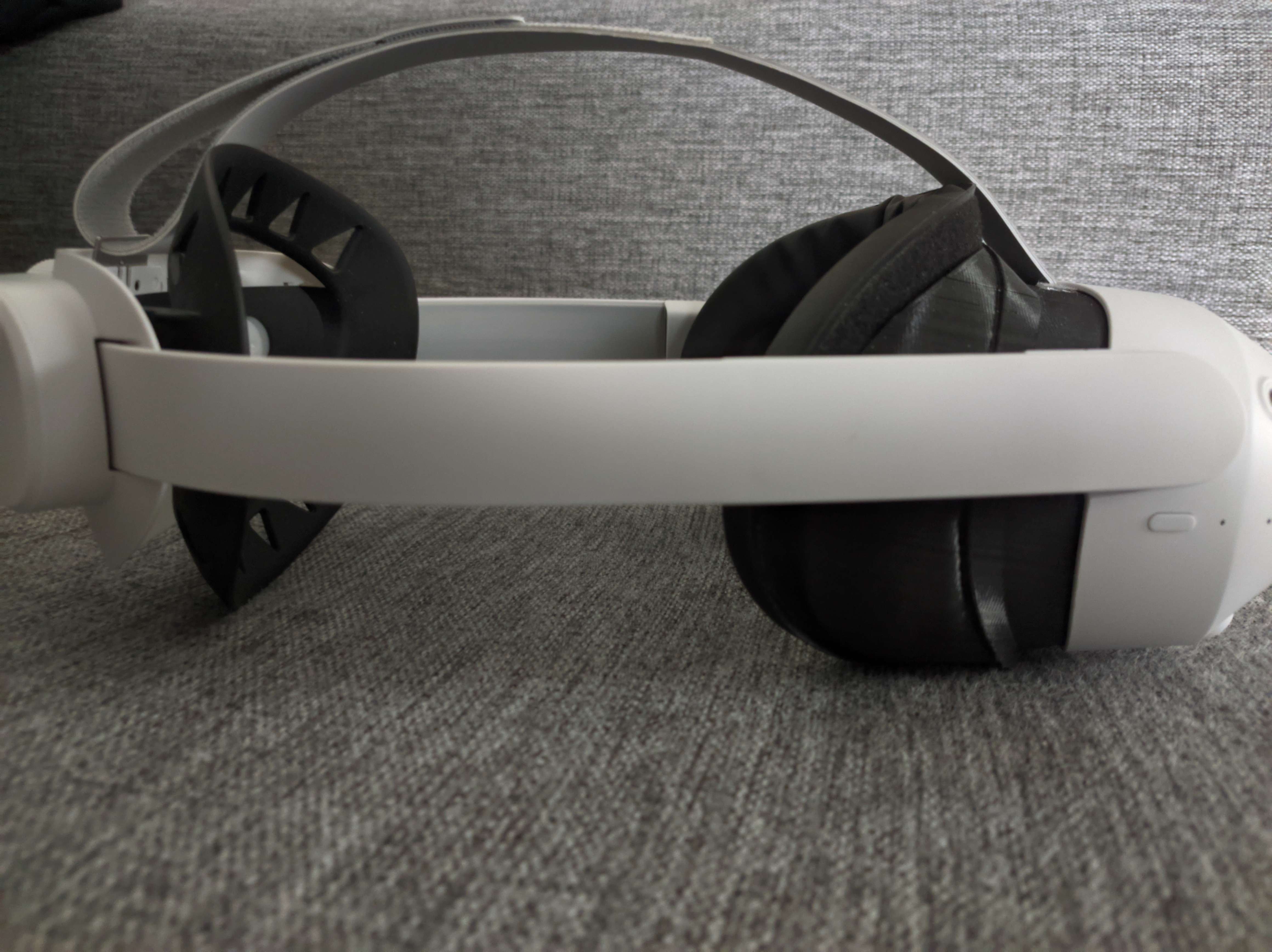
My modified Pico 4 Ultra for extended comfort
Battery & Charging
The device supports up to 55W supercharging which allows you to charge the device from 0% -> 100% in a hour.
The battery life of the device depends on various of configurations it lasts roughly 100% when the device is used with constant passthrough, in general you can expect battery life of 3 hours or so when not using passthrough.
Audio
Audio is subjective, so I can only give my own impression here, and describe what it sounds like to me, you may not end up liking the sound that they produce so you can take this section with a grain of salt.
Speakers
The Pico 4 Ultra contains dual stereo speakers which honestly to me sound just fine, they contain the right amount of bass, the right amount of vocals and the right amount of treble and it is pleasant to listen to.
The speakers give a good sense of 3D audio perception which sounds really good when content uses binaural audio.
Microphone
The Pico 4 Ultra has dual microhone array positioned right on top of your mouth for a clear sound of your voice.
Passthrough
The passthrough of the Pico 4 Ultra is way better any of the other devices I have tried, excluding Apple Vision Pro, it is clear enough to be able to used for everyday tasks such as looking at your monitor, phone and just wearing it while cooking or walking outside, even watching TV was not an issue in my books although I don't recommend you to do what I do.
However, the device performs it's best during high ambient light conditions such as living room with a lot of light coming out of windows, an office environment with well lit enviroment or outdoors usage. In sitatuations where light may be lacking the passthrough becomes noticeably more grainy but it's still perfectly usable.
There is also some distortion in the passthrough which may be noticed in situations with weird geometry, such as when you're moving across rooms it may distort when walking through a door frame, it may also distort when you're looking at a very symmetrical geometry though these distortion are very minor and not noticeable unless you look for them.
The passthrough still doesn't handle certain edge cases of contrast, for example you're sitting in a room and there is a window, because the headset corrects the passthrough for the current ambient light the window will look very bloomy until you get closer to it which the headset then is able to adjust the lighting conditions.
I have noticed during outdoor use the passthrough resolution is not great when you're looking things in a far distance, such as objects such as trees or buildings will start lacking detail and the image ends up looking a bit soft. However this is not an issue in indoors where you're looking everything at reasonable distance.
Performance & Thermals
The performance of the Pico 4 Ultra is great, I can play demanding standalone games with high fidelity and the frametime and framerate is consistent, the device doesn't get too loud or hot thanks to it's well thought thermal design.
It also does provide performant experience for Android applications which lets you run multiple demanding applications, in the settings you have option to prioritize the visual clarity of the environment or increased performance for 2D applications.
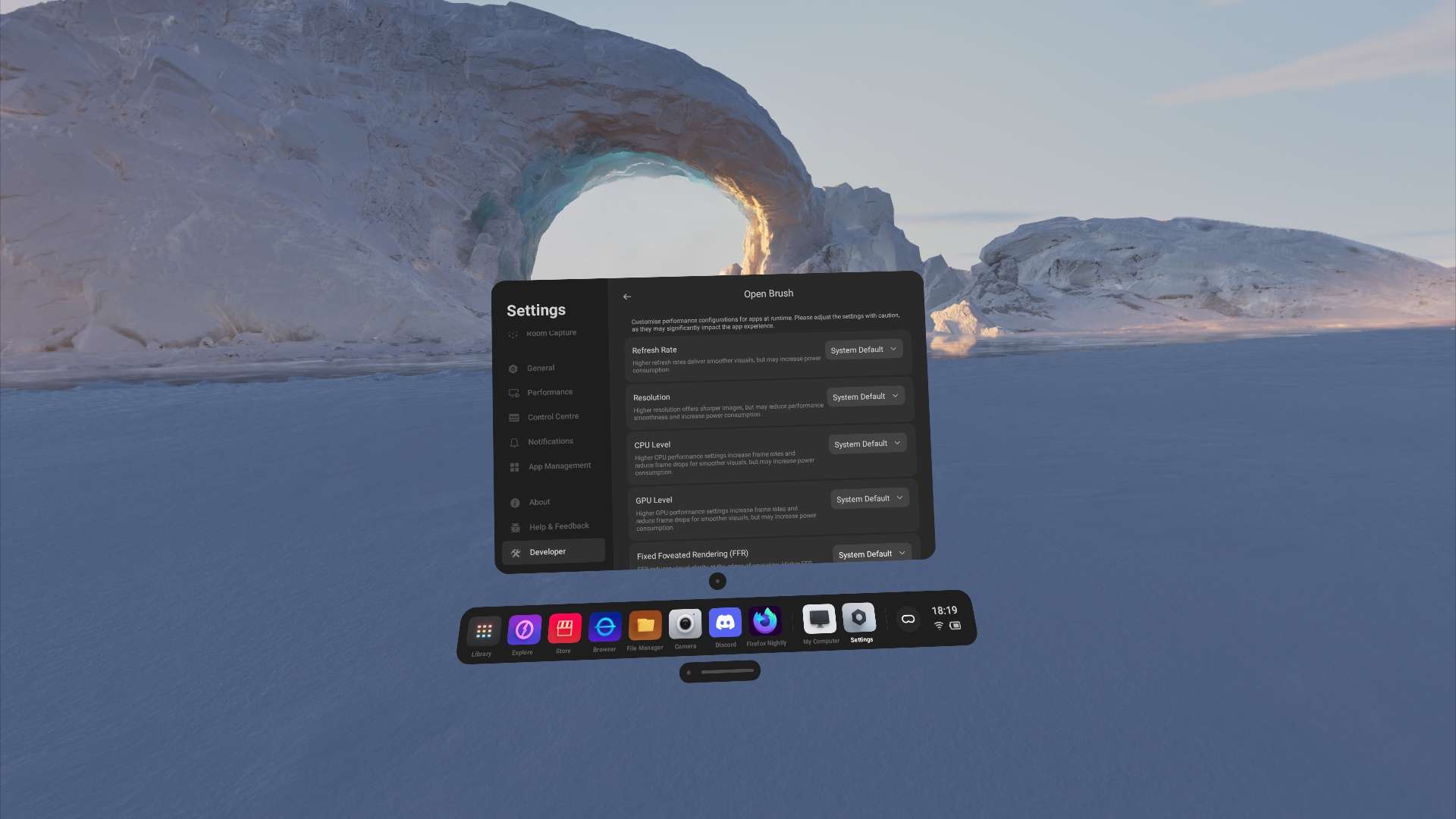
You also can tweak the performance of VR applications through Developer Settings which let's you adjust the framerate, resolution, CPU/GPU level and ffr level, which let's the user decide if they want higher image clarity or perhaps even more battery life by decreasing it.
Software
OOBE (Out-of-box experience)
The Pico 4 Ultra does not enforce account or cloud services for the device operation, when you first boot the device it asks you for a few things: Your language, Your IPD and your consent to collection of analytics, which can be declined of course.
Once the intial setup is you may optionally login or create an account to access additional functionality such as the Pico Store.
Without account however, some of the OS experience may be limited or non-functional but you can use the Headset in PCVR through PICO Connect without an account without an issue if you wish to do so.
Developer Mode
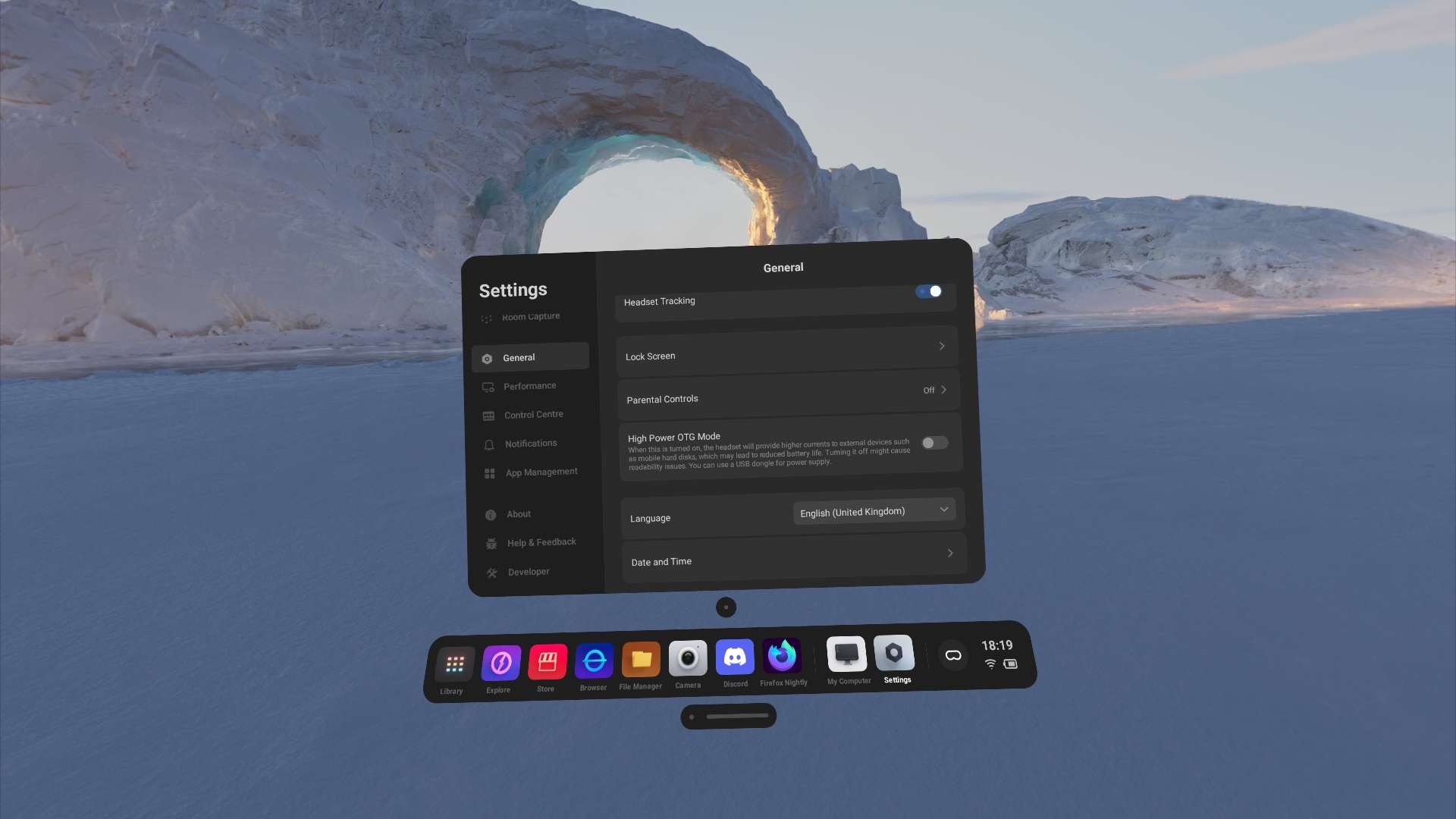
The Developer Mode can be enabled through Settings -> About -> Software Version and clicking it a seven times.
Developer Mode enables you access additional capabilities when connected to a PC with USB Debugging.
You may also use Developer Mode for performance profiling and performance tweaking.
Virtual Environments
The Pico 4 Ultra contains four exclusive high quality virtual environments with audio, and as well the old environments from the older headsets.
However thanks to the community efforts you can now download a wide range of custom environments using PicoThemeManager.
Android Application Support
Pico 4 Ultra has first-party support for Android applications, so you can download Aurora Store and install things like Discord, Twitch or Netflix directly on the device from Google Play, which makes the device great for content consumption.
However, it is not possible as of right now, to change the orientation of applications so if you have an application that does not respect landscape mode it may seem bit odd on the Pico.
Pico 4 Ultra also provides L1 widevine certificate for apps such as Netflix that require it for drm protected content playback.
Window Management
Pico 4 Ultra provides a flexible Window Management system called "PanoScreen" this allows you to have up to 20 applications displayed either in a dome, or in a free position placement, which are freely resizable.
Some applications may also show display in the application dock, if explicitly specified.
There is room for improvement in the current implementation of a free position window as you are not able to rotate them freely, and if window is too close the current minimum window size for free position window's feels bit too large.
Screen Capture
Pico 4 Ultra lets you record footage in three different formats: raw, monoscopic, spatial.
supported resolutions are 1920x1080 or 720x1280 with 1:1 or 16:9 aspect ratio.
Screen Capture captures everything visible on the screen including passthrough.
unique feature of Pico 4 Ultra is it's capability to take Spatial images and videos captures through Screen Capture
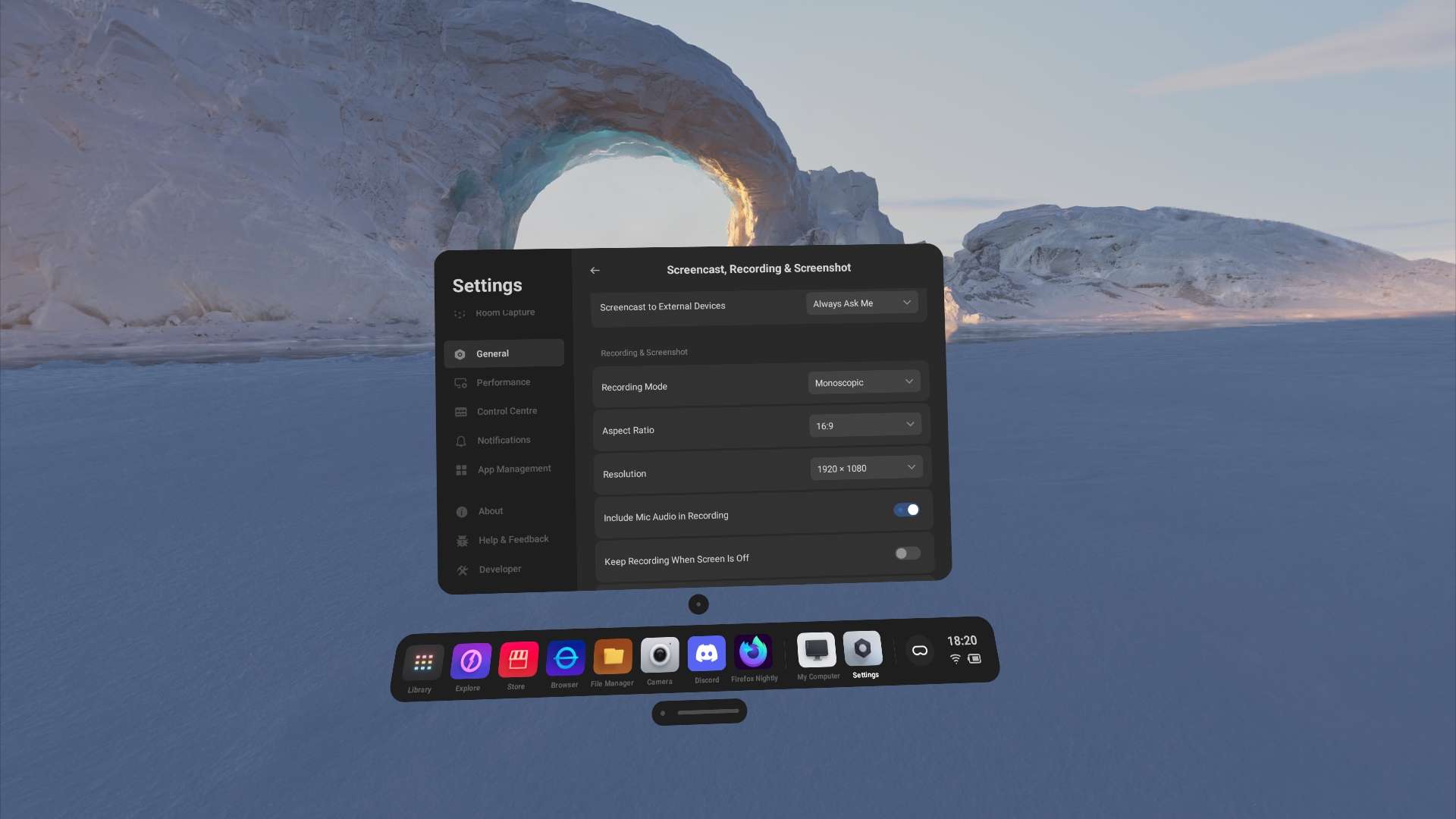
PICO has made this feature very easy to use and it's definitely something I use often
PCVR Streaming
You can play all of your favorite PCVR games through PICO Connect which offers a wide range of features/
PICO Connects supports up to 1000 Mbps H.264 / 150 Mbps HEVC with Wired connection and 300 Mbps H.264 / 150 Mbps Wireless.
Using PICO Connect with a wire at 1000 Mbps H.264 is the best PCVR visual clarity you can get out of the device, but if you prefer using wireless then 300 Mbps H.264 is also a great option.
The PICO Connect has a lot of latency, which really for me personally makes it unbearable for faster games like Beat Saber on Steam but some people are less prone to it.
Desktop Multi-Tasking
PICO Connect supports streaming up to 3 monitors, and if you only have one, two or no monitors, no worries PICO Connect got you covered with up to 3 virtual monitors that you can create. When using PICO Connect with Desktop, you can optionally have a on-screen keyboard in the Headset that can be used to interact with the Desktop.
Desktop streaming bitrate is variable, which means the quality may not be the optimal for flatscreen gaming.
Spatial Content
the Pico 4 Ultra has inbuilt "Photos" app which supports Spatial videos and photos.
You can record Spatial Content either through the inbuilt "Camera" application or through "Screen Capture"
Optionally you can also import compatible media by dragging content to the DCIM folder on the device or, you can use the PICO application on your phone for importing content.
The device can convert 2D photos into Spatial photos locally on the device, for videos you can use the PICO application on your phone to convert videos into Spatial videos.
Pico is compatible with images taken with iPhone 16 or the Apple Vision Pro.
High Power USB OTG
The Pico 4 Ultra supports High Power USB OTG which allows you to use more demanding peripherals such as external SSD.
Pico Motion Trackers
The Pico Motion Trackers are affordable Full Body Tracking solution which uses combination of IR-Constellation for calibration & drift correction and IMU with a machine learning model for pose prediction, it can track 24 joints of human body.
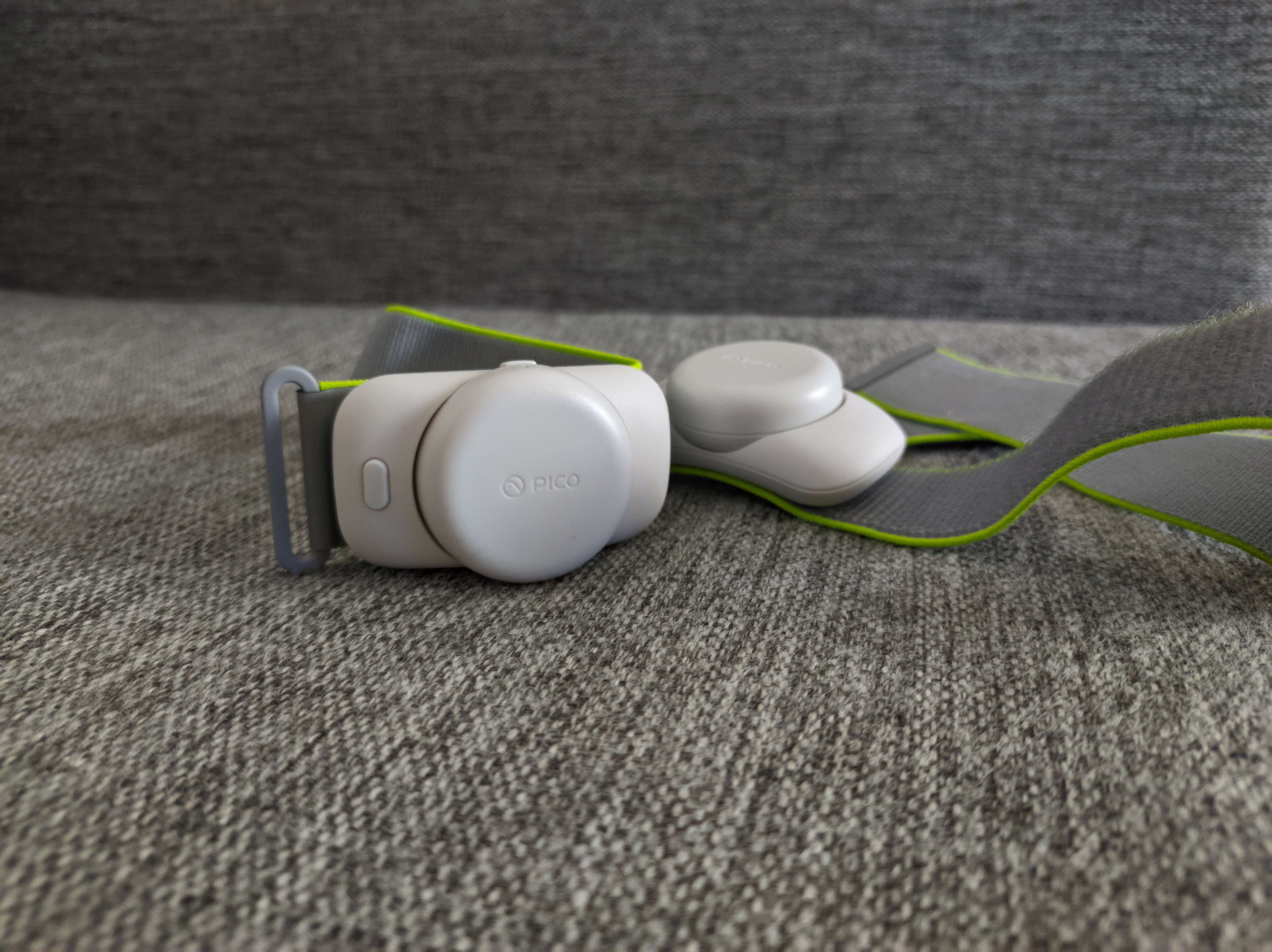
Currently the Pico 4 Ultra supports up to 3 Motion Trackers which you can pair through the Tracker application following the on screen instructions.
Once the trackers are paired you can start the calibration process which should take at most 5 seconds or less, then you can hop into your favorite game and start using the trackers.
PICO has managed to make using the trackers very easy it doesn't require extensive set-up or calibration which makes really makes me prefer them over my Vive Trackers even.
Battery & Charging
The trackers last for over 20 hours of continuous use, and last for weeks if used one hour average per day.
Ergonomics
The tracker weights 27 grams and the strap weights 12 grams for total of 39 grams per tracker.
They are lightweight and very comfortable to use for hours.
Tracking
The accuracy of the Pico Motion Trackers may vary, they are not by any means as good as a Vive Tracker but they provide tracking that works well for conveying human motion, such as walking, jumping, kicking you name it.
As the accuracy is lacking, I feel like they don't provide enough presence for certain applications such as social VR because the the tracking doesn't match your physical movement, one very particular example being the trackers not being able to track above your hips.
And if you feel like using a product called "Motion Tracker" for lazing, that's completely possible! You can use the Pico Motion Trackers to lay or sit without issue for extended period of time.
Though their automatic yaw drift correction relies on movement so if you just keep sitting or laying you may notice some slight drift on yaw axis which will be corrected once you start moving.
The Conclusion
I'm not a hardware reviewer, journalist or influencer nor am I paid to write this review so I won't be endorcing the product or telling you to purchase it through my affliate link.
This review was made from pure appreciation of the device and the software it runs on, as it's commonly misinterpreted due to shitty journalism and influencers who are unable to do their job properly, shame on them.
However I do believe the device is not for everyone and I want to be clear about this, having observed most people purchase these devices for games, the Pico 4 Ultra is a great gaming device because of it's performance, but the problem is the lack of content, so if you're looking to play the latest hot games like Batman or Resident Evil 4 VR unfortunately you wont find that from Pico because they're Meta exclusive.
But when games support Pico such as VRChat or Blade & Sorcery, thanks to the native integration these games run better than on the Quest 3 at higher resolution with lower fan noise and if the title supports it, you also get Full Body Tracking which lets you kick enemies or lay on your couch while you're watching a movie.
Gaming aside, I think the biggest misconception with the Pico 4 Ultra is that it's not just a gaming device it excels at productivity thanks to it's impressive multi-tasking capabilities and its also really great for entertainment thanks the to widevine L1 certificate services like Netflix, Hulu and Amazon Prime works out of box, which means you can enjoy all your series and movies on the device with ease.
I would argue that the Pico 4 Ultra is a tinkerers dream when it comes to Android based Standalone headsets, Pico OS is extremely open and well optimized system that really makes you appreciate using the system, you can tell the developers who work on the system, actually use their own product instead of just digging their nose.
I must say though, I do not recommend this headset for MixedVR setups, such as mixing lighthouse devices and Pico headset, it's an horrible experience and yeah you wont have a good experience. But if you're using the PCVR streaming without any kind of weird setups, it's very standard wireless experience without much complains.
I am also impressed by the Spatial capabilities of the device; passthrough, viewing Spatial Videos & Photos and Recording of Spatial content. It provides such different experience for viewing media that once you experience it, it's hard to go back to boring old 2D unfortunately there is not much content to consume.
That's pretty much my conclusion of the device, feel free to disagree, agree or perhaps not have an opinion. I'm sharing this just because I like what I bought, I can't say that about every device I have owned and because I think the device is undermined due to bad presentation publicly.